Repository navigation
Error in a request to download a file from a drive #344

Description

Error in a request to download a file from a drive
Prerequisites
- Can you reproduce the problem? Yes.
- Are you running the latest version? Yes.
- Are you reporting to the correct repository? Yes.
- Did you perform a cursory search? Yes.
Description
I'm developing a API to manage files from a drive and I'm getting error when I try to download a file by his ID. There is no error when trying in Postman or when trying via Axios.
The request is:
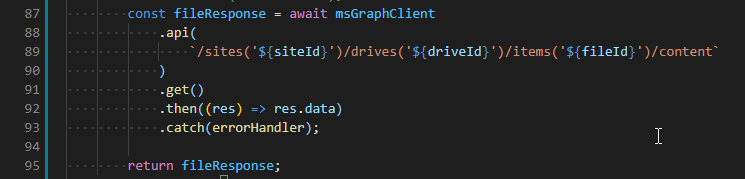
GET https://graph.microsoft.com/v1.0/sites('${siteId}')/drives('${driveId}')/items('${fileId}')/content
Here is my code:
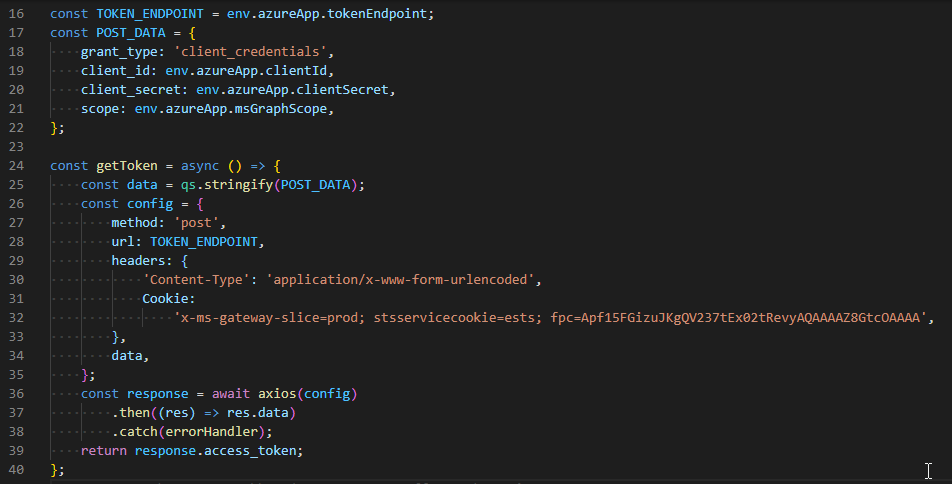
The Microsoft Graph Client, configured to get the token:
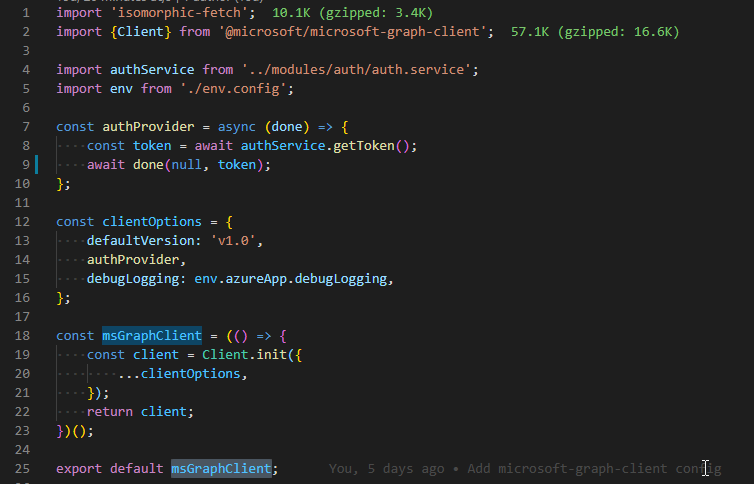
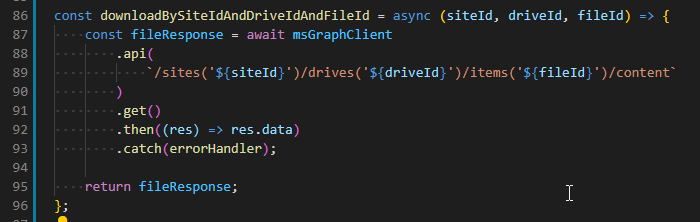
Here is where I'm trying to download the file:
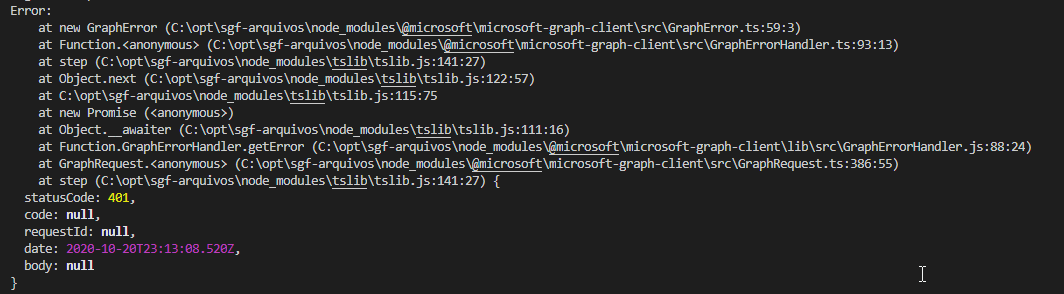
Console Errors:
DEBUGGING PERCEPTIONS:
Here is the correct functioning of the .get(), the token is present. I got this example of other request that works fine:
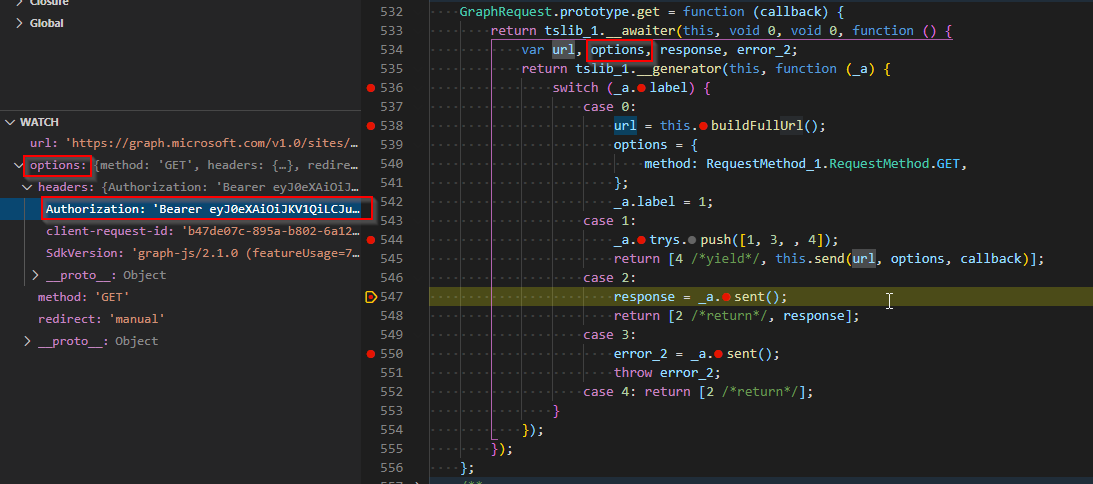
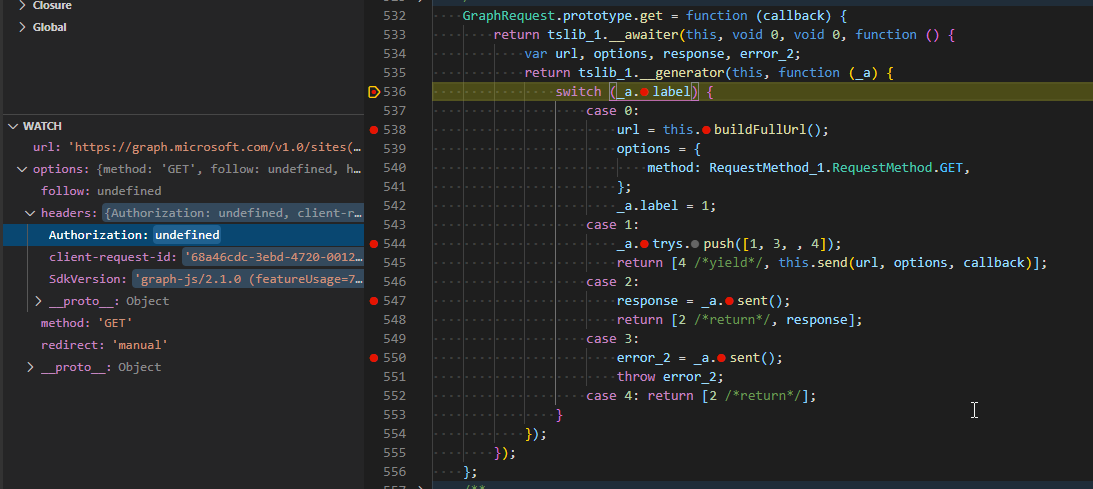
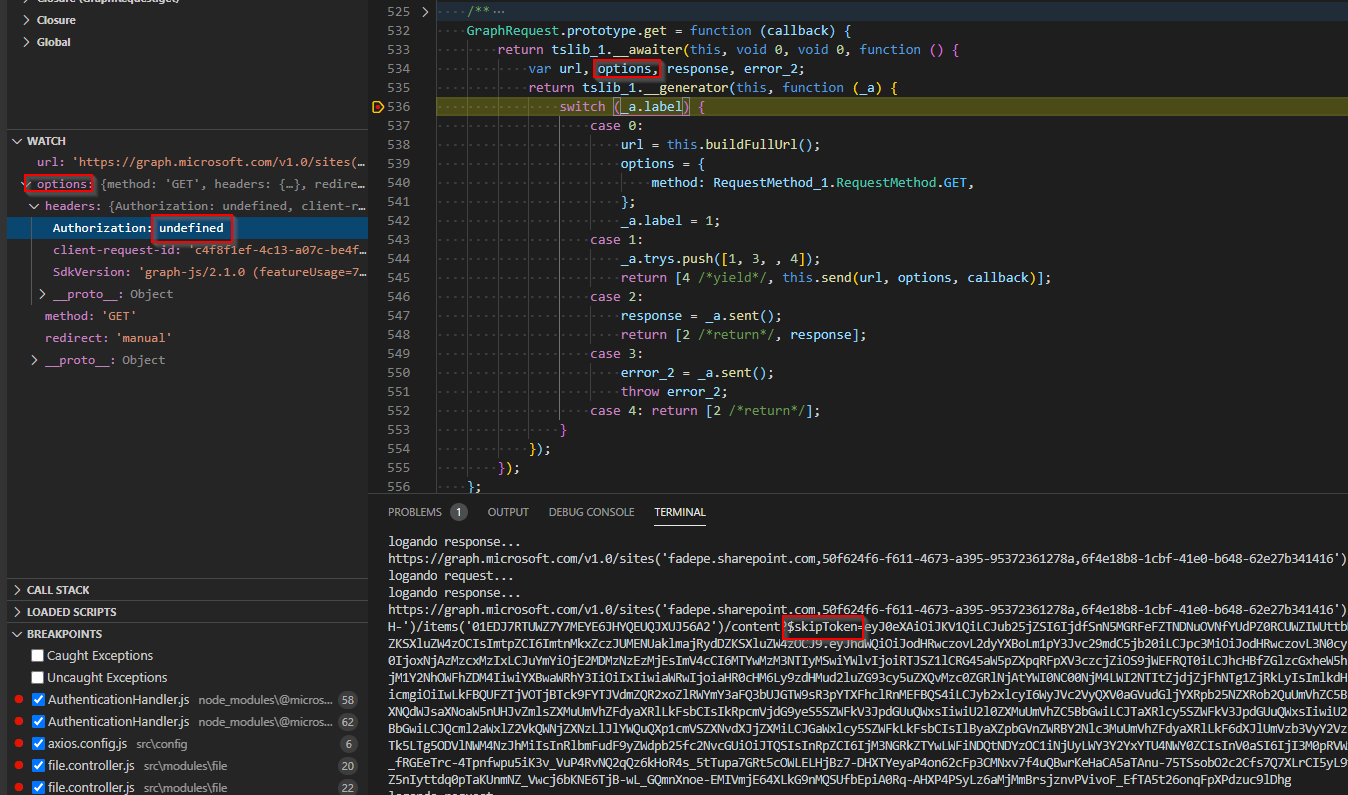
Here is the wrong functioning of the .get(), the token is not present and then I get an Error:
Usage Information
@microsoft/microsoft-graph-client version - 2.1.0
Node Version - 12.18.4
Activity
nikithauc commentedon Oct 21, 2020
Victor Reis (@victorreis) Thank you for reporting this issue.
Can you please give me the steps to reproduce this issue? In the description of this issue you mentioned 'I'm getting error when I try to download a file by his ID.' Can you give me some specifics of the type of account/access token or the ID you are describing here?
Are you querying the 'Graph API' directly through Postman with the url 'https://graph.microsoft.com/v1.0/sites('${siteId}')/drives('${driveId}')/items('${fileId}')/content' and facing the same issue?
victorreis commentedon Oct 22, 2020
Hi Nikitha Chettiar (@nikithauc) ,
The steps to reproduce are below:
Call this orchestrator function:
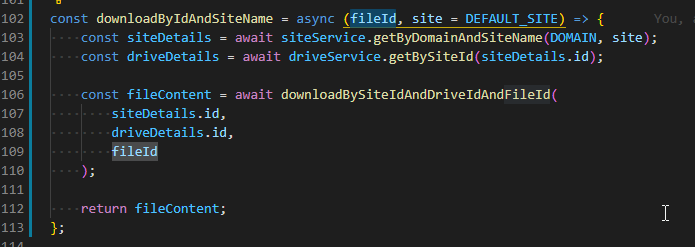
That gets the site details: [token works fine here]
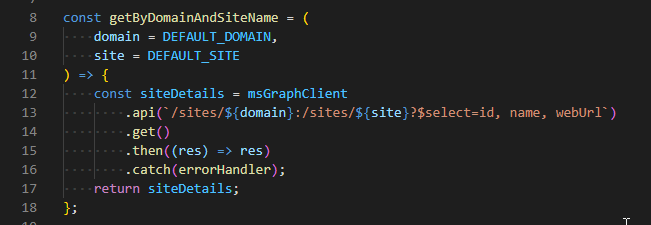
That get drive details: [token works fine here]
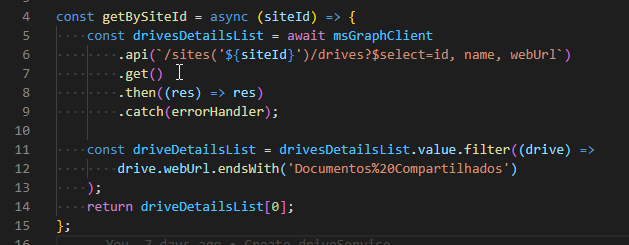
And then tries to download the file: [token wasn't get there]
The "authProvider" function calls this function, that responds the type of authorization:
Maybe this is caused by 3 consecutive calls of token. I don't know how Microsoft Graph Client manages the "authProvider" calls. There are a recommended way to store the token in my ExpressJS API?
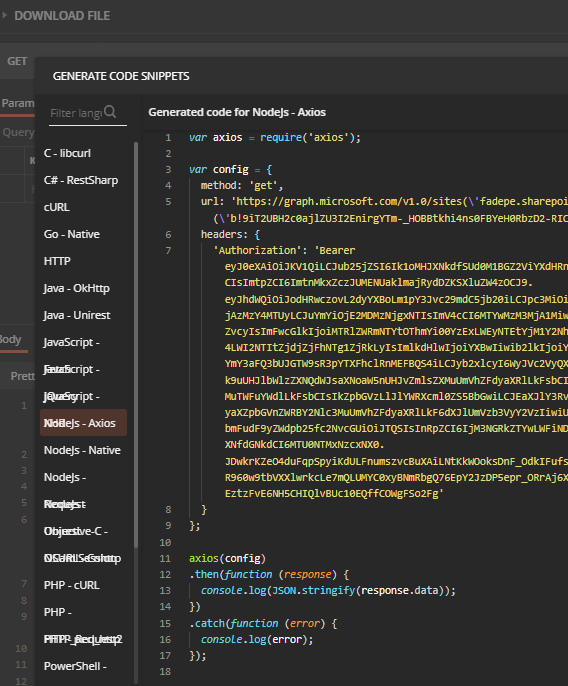
In Postman I'm trying the same URL and it works fine:
https://graph.microsoft.com/v1.0/sites('fadepe.sharepoint.com,50f624f6-f611-4673-a395-95372361278a,6f4e18b8-1cbf-41e0-b648-62e27b341416')/drives('b!9iT2UBH2c0ajlZU3I2EnirgYTm-_HOBBtkhi4ns0FBYeH0RbzD2-RICyt_5R8AH-')/items('01EDJ7RTUWZ7Y7MEYE6JHYQEUQJXUJ56A2')/content
And if I get the code generated by Postman it will works fine in my code, but I makes Microsoft Graph useless.
victorreis commentedon Oct 22, 2020
Hi Nikitha Chettiar (@nikithauc) ,
I tested put the ids and the token hard coded and the error persists, the token isn't sent.
I don't understanding why msGraphClient calls authProvider correctly (I checked) and do not put the token just in this case of the download a file.
Even when I put the skip token with a hard coded token it doesn't work.
nikithauc commentedon Oct 26, 2020
Victor Reis (@victorreis) Are you testing this on a personal account?
Authorization being set as undefined is an expected behavior and it happens in case of a redirection that is when the Graph API redirects to another endpoint.
I am looking into why you are getting an empty error body as in the following screenshot. https://user-images.githubusercontent.com/8744178/96654241-36d17300-1311-11eb-985f-b4a034febaed.png
nikithauc commentedon Oct 26, 2020
Victor Reis (@victorreis) Can you verify the scopes that is set? https://docs.microsoft.com/en-us/graph/api/driveitem-get-content?view=graph-rest-1.0&tabs=http
Can you please provide a fiddler trace if possible of request and response between the graph JS client sdk and Graph API?
victorreis commentedon Oct 26, 2020
I used my job account with permissions granted by the administrator of my organization to set the configs to "get access without a user". With the ClientId, CliendSecret and TenantId I get the token.
I don't know why it's happening, because in the Postman and in the Axios code it works fine.
Thank you! 👍
victorreis commentedon Oct 26, 2020
How can I do that? I installed the "Fiddler Everywhere" and I sent the request via Postman to my local server, but the fiddler doesn't log the internal server request (that uses the microsoft-graph-client).
nikithauc commentedon Oct 27, 2020
Victor Reis (@victorreis) I appreciate your patience and your response to my questions. Thank you!
I came across other issues with respect to CORS issues with file content download such as follows -
#265 (comment)
https://github.com/microsoftgraph/microsoft-graph-docs-contrib/issues/6729
A similar issue with respect to CORS error during a file upload was reported -#265.
Can you try if the following client setting code works for you?
`const authenticationHandler = new AuthenticationHandler(authProvider);
const retryHandler = new RetryHandler(new RetryHandlerOptions());
const httpMessageHandler = new HTTPMessageHandler();
let client = Client.initWithMiddleware({
middleware: authenticationHandler
});`
I want to see if your issue is related to the CORS issue reported. Please let me know if you have more questions.
nikithauc commentedon Oct 28, 2020
Victor Reis (@victorreis) I was able to reproduce this issue. Thank you Peter Ombwa (@peombwa) for the help!
The fix for this is will be included in the next release.
A suggested work around is to as follows-
Get the download url for the item you wish to access as follows -
https://graph.microsoft.com/v1.0/sites('${siteId}')/drives('${driveId}')/items('${fileId}')?$select=@microsoft.graph.downloadUrland use the url to download the file.Refer - #16.
Please let me know if you have more questions.
victorreis commentedon Oct 29, 2020
Thank you! I'm glad to help improve the SDK. 👍
In my case I need to download the file to my API and pass thought the frontend client because the @microsoft.graph.downloadUrl allows any user with the link to download the file. I don't want to give this possibility to the final user.
No more questions, I just need to thank you! Good job! 💯
victorreis commentedon Oct 30, 2020
Nikitha Chettiar (@nikithauc) , I have a question, maybe you can help me. I'm trying to get the response headers, but it doesn't works in the SDK, just in Postman, Axios etc. Here is the code:
I need to get the
response.headers.location, that informs me the link to have the information about the status of the async copy. But response isundefined.Do you want me to open another issue?
nikithauc commentedon Nov 3, 2020
Victor Reis (@victorreis) Thank you for pointing this issue!
I have opened a new issue for this https://github.com/microsoftgraph/msgraph-sdk-javascript/issues/349.