Preface
It seems that the behaviour described below only can be reproduced on Windows machines using cygwin.
MINGW seems to work fine.
I was able to reproduce that issue with 6.0.0-rc.1 and 6.0.0-rc.2 of the CLI.
Versions
Angular CLI: 6.0.0-rc.2
Node: 8.9.4
OS: win32 x64
Angular: 6.0.0-rc.3
... animations, common, compiler, compiler-cli, core, forms
... http, language-service, platform-browser
... platform-browser-dynamic, router

@angular/cli: 6.0.0-rc.2
@angular-devkit/architect: 0.5.4
@angular-devkit/build-angular: 0.5.4
@angular-devkit/build-optimizer: 0.5.4
@angular-devkit/core: 0.5.4
@angular-devkit/schematics: 0.5.4
@ngtools/json-schema: 1.1.0
@ngtools/webpack: 6.0.0-rc.2.4
@schematics/angular: 0.5.4
@schematics/update: 0.5.4
typescript: 2.7.2
webpack: 4.5.0
Repro steps
ng new angularProjectng m layout or ng generate module layout
Observed behavior
The schematic is placed in the root directory of the angular project.
Somehow the whole absolute path is recreated inside the project's folder.
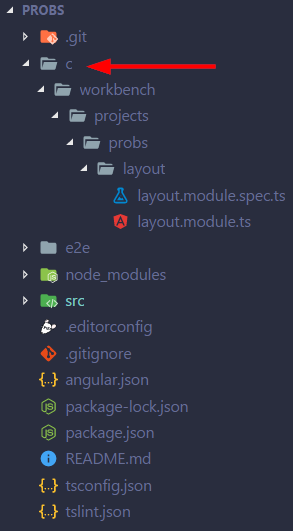
The console output indicates that the schematic was created in the right directory.
@myMachine /c/workbench/projects/probs
± ng generate module layout
CREATE c/workbench/projects/probs/layout/layout.module.spec.ts (275 bytes)
CREATE c/workbench/projects/probs/layout/layout.module.ts (190 bytes)
Desired behavior
The schematic should be created inside src/app.

Preface
It seems that the behaviour described below only can be reproduced on Windows machines using
cygwin.MINGW seems to work fine.
I was able to reproduce that issue with
6.0.0-rc.1and6.0.0-rc.2of the CLI.Versions
Repro steps
ng new angularProjectng m layoutorng generate module layoutObserved behavior
The schematic is placed in the root directory of the angular project.
Somehow the whole absolute path is recreated inside the project's folder.
The console output indicates that the schematic was created in the right directory.
Desired behavior
The schematic should be created inside
src/app.