Repository navigation
The system become extremely slow when loading a huge Java workspace #1236
Description

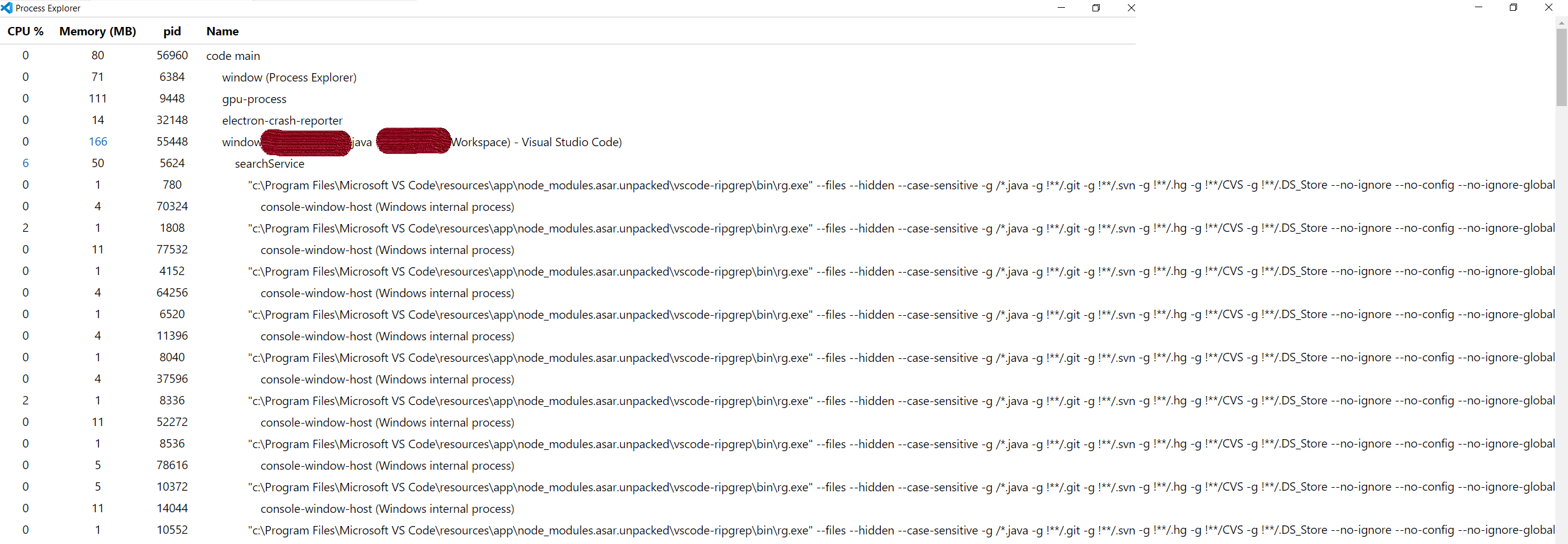
I have a huge Java workspace that contains 40+ Java projects. Some projects are migrated from Eclipse, some are from IntelliJ. Every project has 200+ Java files in average. This workspace is using Git. When I open this workspace, the system become extremely slow. Even mouse is freezing in every seconds. The task manager lists 100+ "rg.exe" are created by vscode. When the project is loaded (after 2~3 minutes), the system returns to normal and "rg.exe" processes are exited.
I report this performance issue here because the command line parameter of "rg.exe" contains "*.java" .
Environment
- Operating System:
Microsoft Windows [Version 10.0.17763.914] - JDK version:
JavaSE-1.6, JavaSE-1.8 - Visual Studio Code version:
win32-x64-1.41.1 - Java extension version:
0.55.1
Steps To Reproduce
- Install extension "Java Extension Pack"
- Disable all extensions except "Language support for Java"
- Open a workspace that contains 40+ Java projects
[attach a sample project reproducing the error]
I don't know how to create a huge Java workspace quickly.
attach logs
I can't upload the log, because it contains sensitive information. But I can provide a screenshot of process explorer that was taken when the system is slow.
Activity
Eskibear commentedon Jan 15, 2020
@Nukepayload2 Are you opening a single folder containing 40+ Java projects, or a workspace containing 40+ root folder (e.g. via Add Folder to Workspace...)?
For the latter, I guess it might be related to https://github.com/redhat-developer/vscode-java/pull/1201/files#diff-45327f86d4438556066de133327f4ca2R863
For each workspace folder, it searches the whole workspace for *.java files. And below is what the API author suggests to do:
Nukepayload2 commentedon Jan 16, 2020
@Eskibear I'm opening a workspace that containing 40+ root folders. What should I do now? Wait for fix or edit a configuration file?
Eskibear commentedon Jan 17, 2020
I tried limiting the search scope to current workspace root, and did a simple test with a workspace containing 6 projects, and it turned out to be a big performance boost.
Before
workspace.findFiles("*.java", undefined, 1);workspace.findFiles("{src, test}/**/*.java", undefined, 1);After limiting search scope with a RelativePattern
workspace.findFiles(new RelativePattern(rootFolder, "*.java"), undefined, 1);workspace.findFiles(new RelativePattern(rootFolder, "{src, test}/**/*.java"), undefined, 1);Bhawika16 commentedon May 17, 2024
Where we have to do this change? @Eskibear @Nukepayload2 @gbraad . Can you please tell