Repository navigation
Image resizeModes contain & center render incorrectly on Android #17684
Description

Is this a bug report?
Yes
Have you read the Contributing Guidelines?
Yes
Environment
I don't have the CLI set up, or rather, I don't know how to invoke it from a local Git copy of react-native. For the sake of complying with the issue template, my environment is:
Environment:
OS: macOS High Sierra 10.13.2
Node: 8.9.3
Yarn: 1.3.2
npm: 5.5.1
Watchman: 4.7.0
Xcode: Xcode 9.0.1 Build version 9A1004
Android Studio: 3.0.1 AI-171.4443003
Packages:
react-native at latest master (431670f)
react: 16.2.0 => 16.2.0
Target Platform: Android (I am running 7.0 on Genymotion)
Steps to Reproduce
- Run RNTester on both iOS and Android.
- Go to the
<Image>page on both and scroll down to the "Resize Mode" section. - Observe the difference between the rendering of the
containimages on both, for the case where the image is larger than its view. - Observe the similarly broken rendering of
center(which is an Android-only value ofresizeMode)
Expected Behavior
resizeMode="contain"
The image should be scaled down to fit the view in a "letterboxed" manner, leaving empty space at the top and bottom in this case. See documentation:
contain: Scale the image uniformly (maintain the image's aspect ratio) so that both dimensions (width and height) of the image will be equal to or less than the corresponding dimension of the view (minus padding).
And see correct behaviour on iOS:
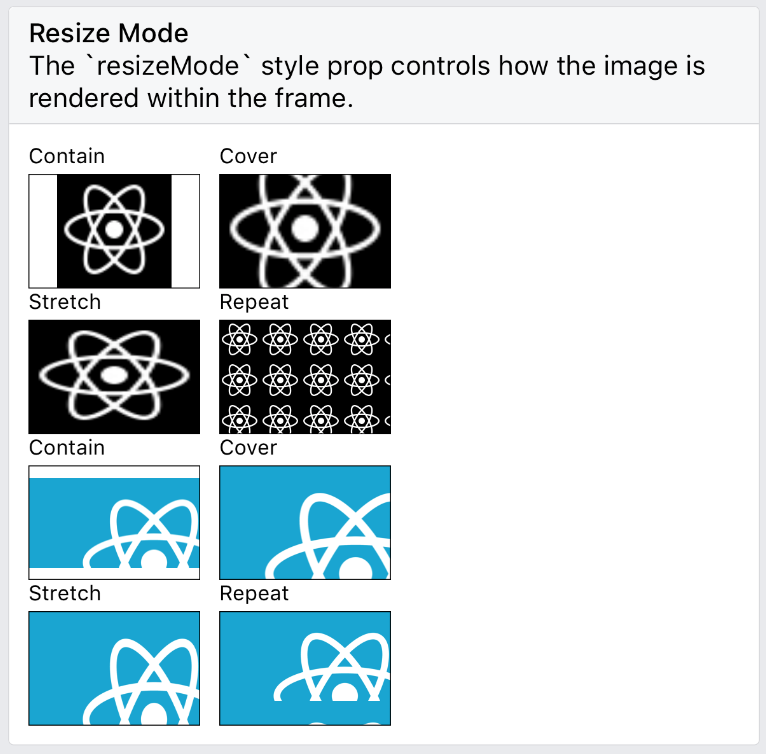
resizeMode="center"
(See also: #17759)
No corresponding iOS screenshot, and the documentation currently omits this value. However, it's clear from the actual behaviour (see below) that there is a bug, similar to the contain case.
Actual Behavior
On Android, for both resizeMode="contain" and resizeMode="center", the shrunk image (bottom set of examples, blue background) seems to be drawn on top of an incorrectly scaled or unscaled copy of itself:

Reproducible Demo
Reproducible in RNTester as-is. I can also put together a Snack if that helps.
Activity
RidaRidss commentedon Jan 24, 2018
import ImageResizer from "react-native-image-resizer";
// first upload image with resizing using below block of code
if (image_uri) {
ImageResizer.createResizedImage(image_uri, 800, 600, "JPEG", 100)
.then(resizedImage => {
this.setState({
image: resizedImage.uri
});
})
.catch(err => {
console.log(err);
});
}
// show image after resize
<Image
style={{
// marginTop: 20,
width: Metrics.image.tiny,
height: Metrics.image.tiny
}}
source={Images.next}
resizeMode="contain"
/>
motiz88 commentedon Jan 24, 2018
@RidaRidss that looks like a reasonable workaround for these
resizeModeissues; there's alsoImageManipulatorfor Expo users. However, this issue is about the behaviour of<Image>itself.motiz88 commentedon Jan 27, 2018
After a bit of digging, this is likely due to the Fresco/Android caveat discussed in facebook/fresco#153 and http://frescolib.org/docs/rounded-corners-and-circles.html#caveats.
kimthangatm commentedon Aug 18, 2018
I get sample error, because I forgot style Image with
width and heightstale commentedon Nov 16, 2018
Hey there, it looks like there has been no activity on this issue recently. Has the issue been fixed, or does it still require the community's attention? This issue may be closed if no further activity occurs. You may also label this issue as "For Discussion" or "Good first issue" and I will leave it open. Thank you for your contributions.
stale commentedon Nov 23, 2018
Closing this issue after a prolonged period of inactivity. If this issue is still present in the latest release, please feel free to create a new issue with up-to-date information.
Fix repeated edges issue for Drawee & Vito bitmap rounding if image d…