Repository navigation
BorderColor and borderWidth are missing when using borderRadius #17432
Description

Is this a bug report?
Yes
Have you read the Contributing Guidelines?
Yes
Environment
Environment:
OS: Windows 10
Node: 8.6.0
Yarn: Not Found
npm: 5.3.0
Watchman: Not Found
Xcode: N/A
Android Studio: Version 3.0.0.0 AI-171.4443003
Packages: (wanted => installed)
react: 16.0.0 => 16.0.0
react-native: 0.50.3 => 0.50.3
Steps to Reproduce
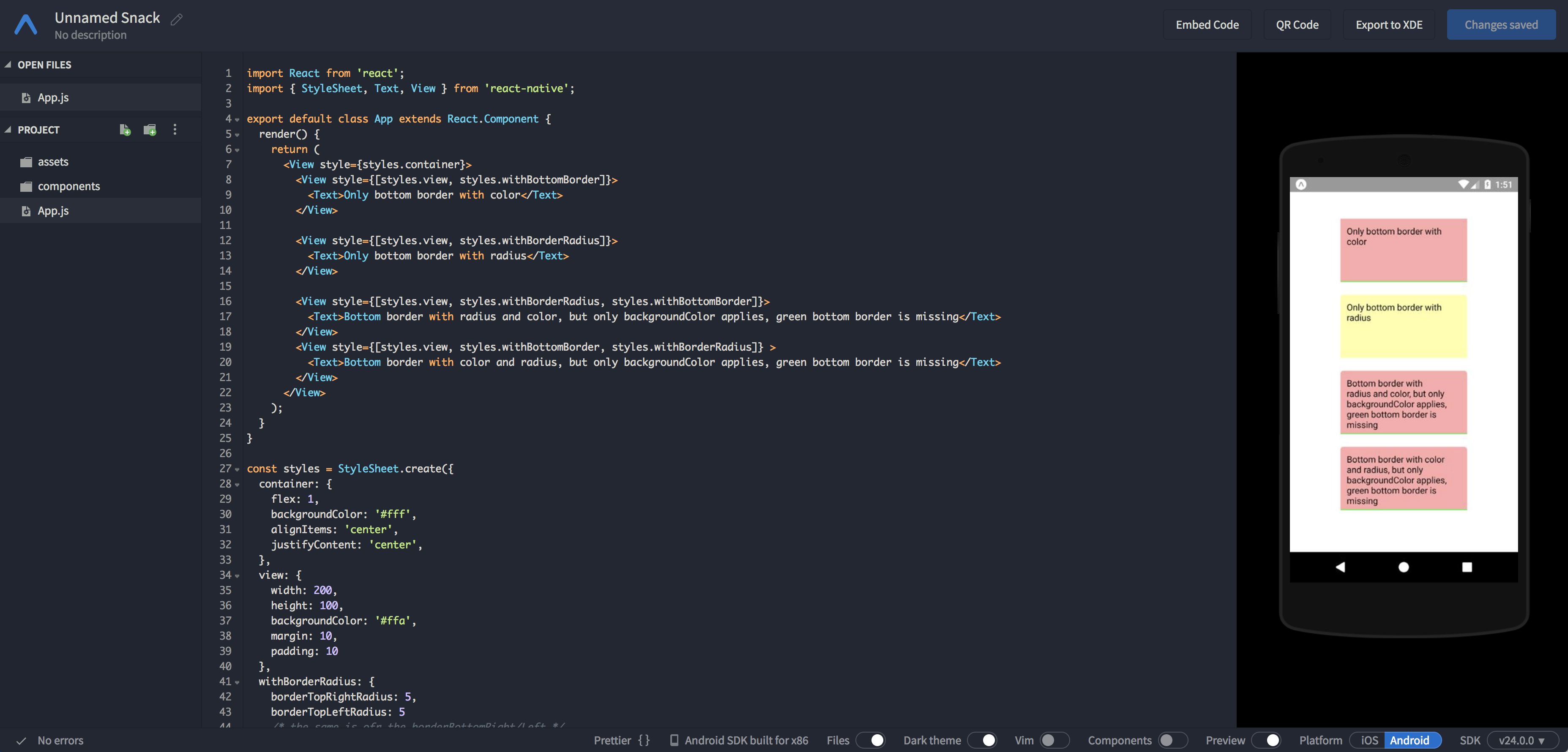
Minimal example:
import React from 'react';
import { StyleSheet, Text, View } from 'react-native';

export default class App extends React.Component {
  render() {
    return (
      <View style={styles.container}>
        <View style={[styles.view, styles.withBottomBorder]}>
          <Text>Only bottom border with color</Text>
        </View>

        <View style={[styles.view, styles.withBorderRadius]}>
          <Text>Only bottom border with radius</Text>
        </View>

        <View style={[styles.view, styles.withBorderRadius, styles.withBottomBorder]}>
          <Text>Bottom border with radius and color, but only backgroundColor applies, green bottom border is missing</Text>
        </View>
        <View style={[styles.view, styles.withBottomBorder, styles.withBorderRadius]} >
          <Text>Bottom border with color and radius, but only backgroundColor applies, green bottom border is missing</Text>
        </View>
      </View>
    );
  }
}

const styles = StyleSheet.create({
  container: {
    flex: 1,
    backgroundColor: '#fff',
    alignItems: 'center',
    justifyContent: 'center',
  },
  view: {
    width: 200,
    height: 100,
    backgroundColor: '#ffa',
    margin: 10,
    padding: 10
  },
  withBorderRadius: {
    borderTopRightRadius: 5,
    borderTopLeftRadius: 5
    /* the same is ofr the borderBottomRight/Left */
  },
  withBottomBorder: {
    borderBottomColor: '#0f0',
    borderBottomWidth: 1,
    backgroundColor: '#faa'
  }
});
Expected Behavior

Last two should look like first one, but with border radius at the top.
Actual Behavior
Border is missing when using borderRadius
Reproducible Demo
Look minimal example above with screens.
Reacted by Lucas Bento
Activity
[-]BorderColor and borderWidth is missing when using borderRadius[/-][+]BorderColor and borderWidth are missing when using borderRadius[/+]dogbutcat commentedon Jan 4, 2018
With example you given, it seems no problem on expo, change a physic phone to have a try, maybe resolution problem.
Patys commentedon Jan 4, 2018
I used also real device. Xiaomi redmi 4x in dev mode.
Problem exists.
porluz commentedon Jan 11, 2018
looks related to #8236, #9759, #11042
yexiaosong commentedon Feb 7, 2018
same problem
lucasbento commentedon Feb 12, 2018
Reproducible on emulator Nexus 5X API 26 as well.
fufuninja commentedon Feb 23, 2018
+1 here. Using BorderTop instead as temporary replacement.
react-native-bot commentedon Feb 24, 2018
Thanks for posting this! It looks like you may not be using the latest version of React Native, v0.53.0, released on January 2018. Can you make sure this issue can still be reproduced in the latest version?
I am going to close this, but please feel free to open a new issue if you are able to confirm that this is still a problem in v0.53.0 or newer.
How to Contribute • What to Expect from Maintainers
salmanwaheed commentedon Feb 24, 2018
salmanwaheed commentedon Feb 24, 2018
ADcorpo commentedon Mar 2, 2018
This is still happenning as of now (React Native 0.54)
usfslk commentedon Oct 19, 2018
Also happens on react.js, borderWidth and borderColor are ignored if borderRadius is set to a default value
rahulworld commentedon Nov 27, 2018
Can use
border: '1px solid #000000'
It will work.
Rojuinex commentedon Dec 12, 2018
Still having this issue in 0.57.4