You signed in with another tab or window. Reload to refresh your session.You signed out in another tab or window. Reload to refresh your session.You switched accounts on another tab or window. Reload to refresh your session.Dismiss alert
When creating new instance Compute Offering and Disk Size is not showing entries.
STEPS TO REPRODUCE
Create instance on ACS with several pages of compute and disk offerings.

Edit:
From user/admin perspective it looks that select is happening on all 340 items and then those who are not belonging
to DOMAIN are filtered as invisible. Those who stay visible are not reordered afterwards and stay on pages where they
initially were assigned on first filter/select. Pressing on page numbers one by one will show you all offerings assigned
to domain but in order they were first filtered/selected and assigned to page numbers.
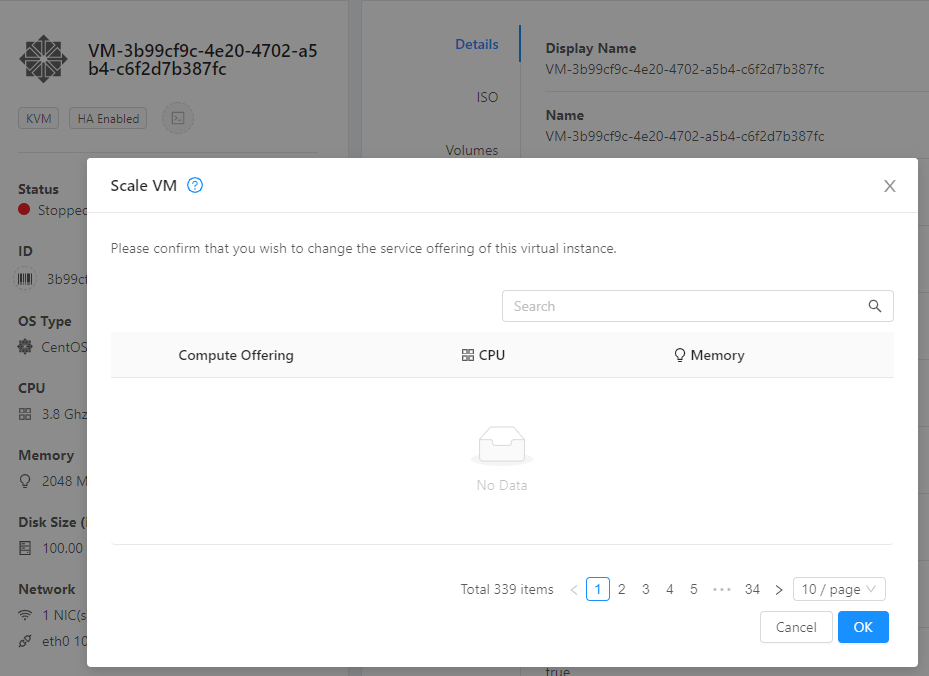
Same problem also happens when you press on Scale VM.
EXPECTED RESULTS
Showing 10 Compute Offerings and Disk Size per page by default
ACTUAL RESULTS
Not showing 10 Compute Offerings and Disk Size per page by default


ISSUE TYPE
COMPONENT NAME
CLOUDSTACK VERSION
CONFIGURATION
OS / ENVIRONMENT
SUMMARY
When creating new instance Compute Offering and Disk Size is not showing entries.
STEPS TO REPRODUCE
Same problem also happens when you press on Scale VM.
EXPECTED RESULTS
ACTUAL RESULTS