Repository navigation
UX Audit and Recommendations #16669

Description

Type: other
Hi everyone, I'm Glenn. I've contributed UX and visual design to Signal, Haven, and OnionShare in the past, and I put together a UX audit and design recommendations for HTTPS Everywhere. I'd love your thoughts and feedback...
The Problem - UX Hypothesis
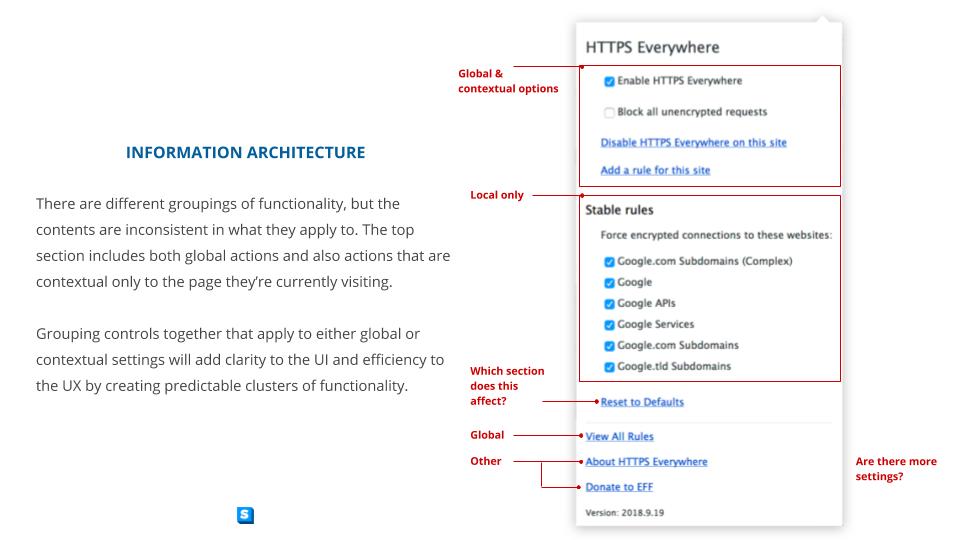
The functionality within the extension panel uses mixed metaphors for the UI and inconsistent hierarchical groupings of functionality which can lead to confusion and frustration for users and create barriers to interaction or adoption.
The Problem - Visual Hypothesis
With the evolving UX of the competitive landscape, the design language and UI of HTTPS Everywhere has become dated.
The Opportunity
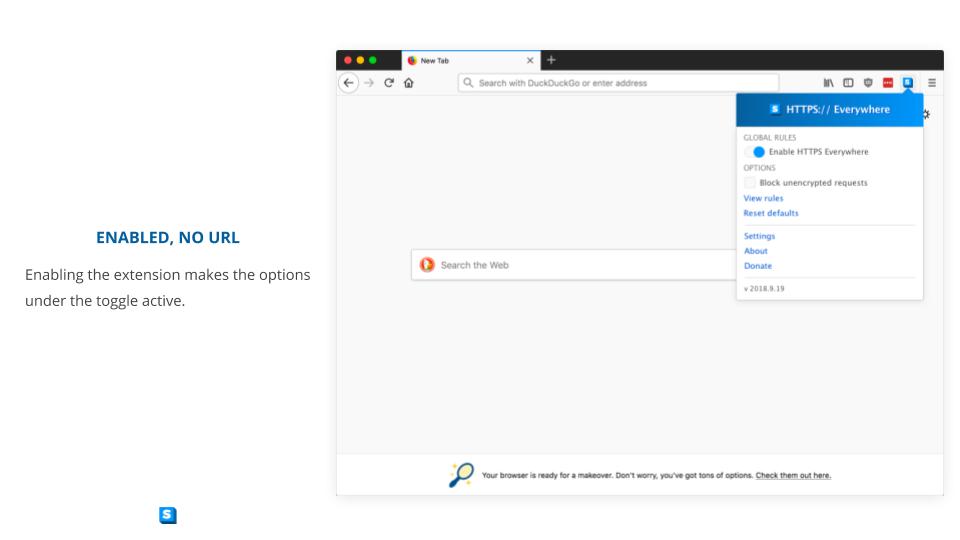
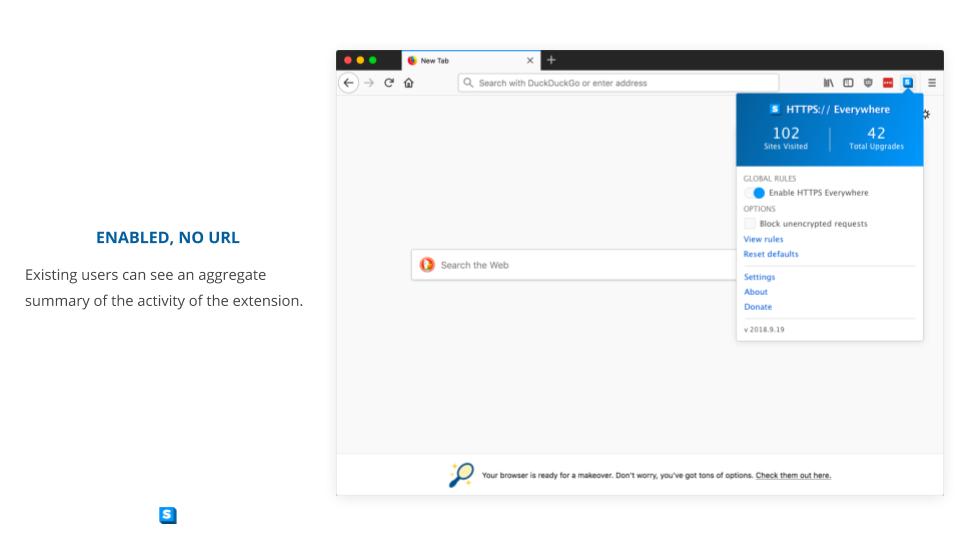
By creating hierarchical groupings of functionality and by using appropriate controls in the UI, we can create a highly usable and beautiful user experience.











Activity
Hainish commentedon Oct 3, 2018
@glenn-sorrentino Thanks so much for putting this together. I will have time to review it hopefully either tomorrow or the next day. This is truly awesome work.
cschanaj commentedon Oct 3, 2018
@glenn-sorrentino thanks for the great works!! It would be great to see the recommended changes happening. Just a few things I would like to add for discussions
P.S. "Reset to defaults" will clear the ruleset states (active or not) globally, it should be a "Global & contextual options", a button perhaps (!?)
glenn-sorrentino commentedon Oct 3, 2018
@Hainish My pleasure. I just updated the document with @cschanaj's suggestions.
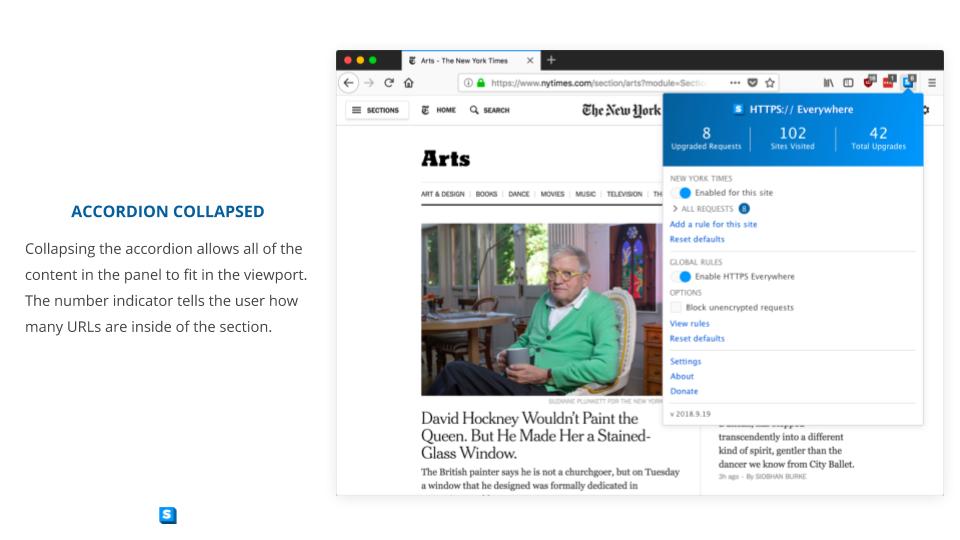
@cschanaj - I added an accordion section for the URLs so that the use case you suggested is covered. I also added a section-by-section "Reset" so that it gives more flexibility to the user. Also good suggestion about how deep the other settings are - I added a "Settings" link in the last section of the menu!
zoracon commentedon Oct 3, 2018
@glenn-sorrentino Just echoing @Hainish here but this is a great contribution! I was wondering what were your thoughts on the new "Disable HTTPS Everywhere on this site" feature. Do you picture a toggle would work for that as well?
glenn-sorrentino commentedon Oct 3, 2018
@zoracon I have a toggle for that functionality, but the label is "Enable for this site" so that the user is turning off something that's on - I think it might be confusing to say "disable for this site" to turn on the off mode... make sense?
zoracon commentedon Oct 3, 2018
Ah I missed that in the doc. Makes sense to me! Thank you!
BenBE commentedon Oct 4, 2018
I'd prefer the options (Block unencrypted traffic) to also use a toggle for more consistency.
Also what about aligning the labels next to the toggles and the checkboxes, avoiding the step currently introduced by those elements being of different width.
glenn-sorrentino commentedon Oct 4, 2018
ghostwords commentedon Oct 17, 2018
Hi @glenn-sorrentino! We could really use your help over at HTTPS Everywhere's sibling project Privacy Badger. I think our biggest UX issue is that we still prominently show sliders in the popup even though we don't want most people to fiddle with them. This leads to general confusion about how Privacy Badger works, and, more specifically, users unintentionally breaking the Web for themselves. Thanks in advance for any help, totally understand if you are busy/not interested, and sorry for hijacking the thread!
Bisaloo commentedon Nov 4, 2018
What's the status here? If everyone agrees, we should probably give @glenn-sorrentino the green light to submit a PR.
Unless the EFF own UX team is preparing some feedback on this?
Hainish commentedon Nov 5, 2018
@Bisaloo thanks for keeping this thread alive. Our UX team plans on sitting down with @glenn-sorrentino and talking over some of these changes. Once this is done I plan on implementing it!
geekley commentedon Jan 4, 2019
Just my own opinions on the topic, as an outsider... (in case it helps)
I think the specific domain URL to which the site-specific settings apply should appear, right? Instead of the site "name" where you have NEW YORK TIMES.
This way I would know if the settings apply to all of *.example.com or just domain.example.com. For example:
I think that, by naming the list "ALL REQUESTS", it isn't entirely clear what that list means.
Is this the list of custom rules that apply to the site? Maybe it should be named "CUSTOM RULES FOR THIS SITE" or something.
Maybe it's just me, but, in the way it's placed, I'm not entirely sure of what the upper "reset defaults" resets, exactly. Would it be everything on the site-specific section, including the toggle? Just the list?
As for the lower "reset defaults", if it resets all settings of the extension, including settings specific for every site, maybe it shouldn't be too acessible, but only inside the settings page. And in this case it should be named "Reset all settings to default".
I personally would put the small options at the footer on a single line. This would help reduce blank vertical space (for laptop screens and small browser windows) and make it visually distinct from the other settings.
I would also move the extension version to the header, on the right, after HTTPS Everywhere, in small font size, and use the logotype for the extension name.
By the way, the ruleset version is missing in the design image. I think it could be shown somewhere inside the GLOBAL RULES section.
zoracon commentedon Feb 15, 2019
As an update: Development for the menu will start soon (next week) to implement wire frames derived from this audit and internal UX research!
andresbase commentedon May 6, 2019
I have removed some inappropriate comments.
Hainish commentedon Jul 8, 2019
We've implemented UX changes based on this and other audits. Thanks so much @glenn-sorrentino !