-
-
Notifications
You must be signed in to change notification settings - Fork 795
Expand file tree
/
Copy pathREADME.md
More file actions
379 lines (287 loc) · 12.3 KB
/
README.md
File metadata and controls
379 lines (287 loc) · 12.3 KB
1
2
3
4
5
6
7
8
9
10
11
12
13
14
15
16
17
18
19
20
21
22
23
24
25
26
27
28
29
30
31
32
33
34
35
36
37
38
39
40
41
42
43
44
45
46
47
48
49
50
51
52
53
54
55
56
57
58
59
60
61
62
63
64
65
66
67
68
69
70
71
72
73
74
75
76
77
78
79
80
81
82
83
84
85
86
87
88
89
90
91
92
93
94
95
96
97
98
99
100
101
102
103
104
105
106
107
108
109
110
111
112
113
114
115
116
117
118
119
120
121
122
123
124
125
126
127
128
129
130
131
132
133
134
135
136
137
138
139
140
141
142
143
144
145
146
147
148
149
150
151
152
153
154
155
156
157
158
159
160
161
162
163
164
165
166
167
168
169
170
171
172
173
174
175
176
177
178
179
180
181
182
183
184
185
186
187
188
189
190
191
192
193
194
195
196
197
198
199
200
201
202
203
204
205
206
207
208
209
210
211
212
213
214
215
216
217
218
219
220
221
222
223
224
225
226
227
228
229
230
231
232
233
234
235
236
237
238
239
240
241
242
243
244
245
246
247
248
249
250
251
252
253
254
255
256
257
258
259
260
261
262
263
264
265
266
267
268
269
270
271
272
273
274
275
276
277
278
279
280
281
282
283
284
285
286
287
288
289
290
291
292
293
294
295
296
297
298
299
300
301
302
303
304
305
306
307
308
309
310
311
312
313
314
315
316
317
318
319
320
321
322
323
324
325
326
327
328
329
330
331
332
333
334
335
336
337
338
339
340
341
342
343
344
345
346
347
348
349
350
351
352
353
354
355
356
357
358
359
360
361
362
363
364
365
366
367
368
369
370
371
372
373
374
375
376
377
378
379
<div align="center">
<img src="resources/logo.png" alt="Nginx UI Logo">
</div>
# Nginx UI
Yet another Nginx Web UI, developed by [0xJacky](https://jackyu.cn/) and [Hintay](https://blog.kugeek.com/).
[](https://github.com/0xJacky/nginx-ui/actions/workflows/build.yml)
[](https://github.com/0xJacky/nginx-ui "Click to view the repo on Github")
[](https://github.com/0xJacky/nginx-ui/releases/latest "Click to view the repo on Github")
[](https://github.com/0xJacky/nginx-ui "Click to view the repo on Github")
[](https://github.com/0xJacky/nginx-ui "Click to view the repo on Github")
[](https://github.com/0xJacky/nginx-ui "Click to view the repo on Github")
[](https://github.com/0xJacky/nginx-ui/issue "Click to view the repo on Github")
[](https://hub.docker.com/r/uozi/nginx-ui "Click to view the image on Docker Hub")
[](https://hub.docker.com/r/uozi/nginx-ui "Click to view the image on Docker Hub")
[](https://hub.docker.com/r/uozi/nginx-ui "Click to view the image on Docker Hub")
## Documentation
To check out docs, visit [nginxui.com](https://nginxui.com).
## Stargazers over time
[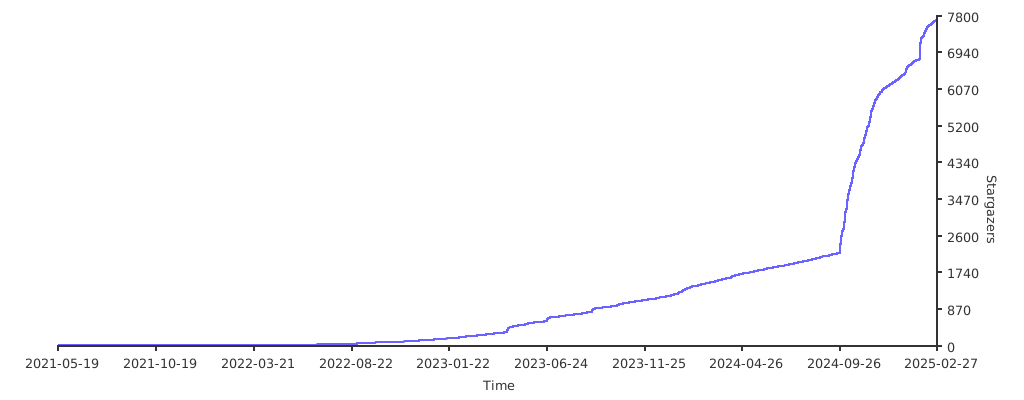](https://starchart.cc/0xJacky/nginx-ui)
English | [Español](README-es.md) | [简体中文](README-zh_CN.md) | [繁體中文](README-zh_TW.md) | [Tiếng Việt](README-vi_VN.md)
<details>
<summary>Table of Contents</summary>
<ol>
<li>
<a href="#about-the-project">About The Project</a>
<ul>
<li><a href="#demo">Demo</a></li>
<li><a href="#features">Features</a></li>
<li><a href="#internationalization">Internationalization</a></li>
<li><a href="#built-with">Built With</a></li>
</ul>
</li>
<li>
<a href="#getting-started">Getting Started</a>
<ul>
<li><a href="#before-use">Before Use</a></li>
<li><a href="#installation">Installation</a></li>
<li>
<a href="#usage">Usage</a>
<ul>
<li><a href="#from-executable">From Executable</a></li>
<li><a href="#with-systemd">With Systemd</a></li>
<li><a href="#with-docker">With Docker</a></li>
</ul>
</li>
</ul>
</li>
<li>
<a href="#manual-build">Manual Build</a>
<ul>
<li><a href="#prerequisites">Prerequisites</a></li>
<li><a href="#build-app">Build Frontend</a></li>
<li><a href="#build-backend">Build Backend</a></li>
</ul>
</li>
<li>
<a href="#script-for-linux">Script for Linux</a>
<ul>
<li><a href="#basic-usage">Basic Usage</a></li>
<li><a href="#more-usage">More Usage</a></li>
</ul>
</li>
<li><a href="#example-of-nginx-reverse-proxy-configuration">Example of Nginx Reverse Proxy Configuration</a></li>
<li><a href="#contributing">Contributing</a></li>
<li><a href="#license">License</a></li>
</ol>
</details>
## About The Project

### Demo
URL:[https://demo.nginxui.com](https://demo.nginxui.com)
- Username:admin
- Password:admin
### Features
- Online statistics for server indicators such as CPU usage, memory usage, load average, and disk usage.
- Online ChatGPT Assistant
- One-click deployment and automatic renewal Let's Encrypt certificates.
- Online editing websites configurations with our self-designed **NgxConfigEditor** which is a user-friendly block editor for nginx configurations or **Ace Code Editor** which supports highlighting nginx configuration syntax.
- Online view Nginx logs
- Written in Go and Vue, distribution is a single executable binary.
- Automatically test configuration file and reload nginx after saving configuration.
- Web Terminal
- Dark Mode
- Responsive Web Design
### Internationalization
- English
- Simplified Chinese
- Traditional Chinese
We welcome translations into any language.
### Built With
- [The Go Programming Language](https://go.dev)
- [Gin Web Framework](https://gin-gonic.com)
- [GORM](http://gorm.io)
- [Vue 3](https://v3.vuejs.org)
- [Vite](https://vitejs.dev)
- [TypeScript](https://www.typescriptlang.org/)
- [Ant Design Vue](https://antdv.com)
- [vue3-gettext](https://github.com/jshmrtn/vue3-gettext)
- [vue3-ace-editor](https://github.com/CarterLi/vue3-ace-editor)
- [Gonginx](https://github.com/tufanbarisyildirim/gonginx)
## Getting Started
### Before Use
The Nginx UI follows the Debian web server configuration file standard. Created site configuration files will be placed in the `sites-available` folder that under the Nginx configuration folder (auto-detected). The configuration files for an enabled site will create a soft link to the `sites-enabled` folder. You may need to adjust the way the configuration files are organised.
For non-Debian (and Ubuntu) systems, you may need to change the contents of the `nginx.conf` configuration file to the Debian style as shown below.
```nginx
http {
# ...
include /etc/nginx/conf.d/*.conf;
include /etc/nginx/sites-enabled/*;
}
```
For more information: [debian/conf/nginx.conf](https://salsa.debian.org/nginx-team/nginx/-/blob/master/debian/conf/nginx.conf#L59-L60)
### Installation
Nginx UI is available on the following platforms:
- Mac OS X 10.10 Yosemite and later (amd64 / arm64)
- Linux 2.6.23 and later (x86 / amd64 / arm64 / armv5 / armv6 / armv7)
- Including but not limited to Debian 7 / 8, Ubuntu 12.04 / 14.04 and later, CentOS 6 / 7, Arch Linux
- FreeBSD
- OpenBSD
- Dragonfly BSD
- Openwrt
You can visit [latest release](https://github.com/0xJacky/nginx-ui/releases/latest) to download the latest distribution, or just use [installation scripts for Linux](#script-for-linux).
### Usage
In the first runtime of Nginx UI, please visit `http://<your_server_ip>:<listen_port>/install`
in your browser to complete the follow-up configurations.
#### From Executable
**Run Nginx UI in Terminal**
```shell
nginx-ui -config app.ini
```
Press `Control+C` in the terminal to exit Nginx UI.
**Run Nginx UI in Background**
```shell
nohup ./nginx-ui -config app.ini &
```
Stop Nginx UI with the follow command.
```shell
kill -9 $(ps -aux | grep nginx-ui | grep -v grep | awk '{print $2}')
```
#### With Systemd
If you are using the [installation script for Linux](#script-for-linux), the Nginx UI will be installed as `nginx-ui` service in systemd. Please use the `systemctl` command to control it.
**Start Nginx UI**
```shell
systemctl start nginx-ui
```
**Stop Nginx UI**
```shell
systemctl stop nginx-ui
```
**Restart Nginx UI**
```shell
systemctl restart nginx-ui
```
#### With Docker
Our docker image [uozi/nginx-ui:latest](https://hub.docker.com/r/uozi/nginx-ui) is based on the latest nginx image and
can be used to replace the Nginx on the host. By publishing the container's port 80 and 443 to the host,
you can easily make the switch.
##### Note
1. When using this container for the first time, ensure that the volume mapped to /etc/nginx is empty.
2. If you want to host static files, you can map directories to container.
<details>
<summary><b>Deploy with Docker</b></summary>
1. [Install Docker.](https://docs.docker.com/install/)
2. Then deploy nginx-ui like this:
```bash
docker run -dit \
--name=nginx-ui \
--restart=always \
-e TZ=Asia/Shanghai \
-v /mnt/user/appdata/nginx:/etc/nginx \
-v /mnt/user/appdata/nginx-ui:/etc/nginx-ui \
-p 8080:80 -p 8443:443 \
uozi/nginx-ui:latest
```
3. When your docker container is running, Log in to nginx-ui panel with `http://<your_server_ip>:8080/install`.
</details>
<details>
<summary><b>Deploy with Docker-Compose</b></summary>
1. [Install Docker-Compose.](https://docs.docker.com/compose/install/)
2. Creat a docker-compose.yml file like this:
```yml
version: '3.3'
services:
nginx-ui:
stdin_open: true
tty: true
container_name: nginx-ui
restart: always
environment:
- TZ=Asia/Shanghai
volumes:
- '/mnt/user/appdata/nginx:/etc/nginx'
- '/mnt/user/appdata/nginx-ui:/etc/nginx-ui'
- '/var/www:/var/www'
ports:
- 8080:80
- 8443:443
image: 'uozi/nginx-ui:latest'
```
3. Then creat your container by:
```bash
docker-compose up -d
```
```bash
# If using docker-compose-plugin
docker compose up -d
```
4. When your docker container is running, Log in to nginx-ui panel with `http://<your_server_ip>:8080/install`.
</details>
## Manual Build
On platforms that do not have an official build version, they can be built manually.
### Prerequisites
- Make
- Golang 1.19+
- node.js 18+
```shell
npx browserslist@latest --update-db
```
### Build Frontend
Please execute the following command in `app` directory.
```shell
pnpm install
pnpm build
```
### Build Backend
Please build the app first, and then execute the following command in the project root directory.
```shell
go build -o nginx-ui -v main.go
```
## Script for Linux
### Basic Usage
**Install and Upgrade**
```shell
bash <(curl -L -s https://raw.githubusercontent.com/0xJacky/nginx-ui/master/install.sh) install
```
The default listening port is `9000`, and the default HTTP Challenge port is `9180`.
If there is a port conflict, please modify `/usr/local/etc/nginx-ui/app.ini` manually,
then use `systemctl restart nginx-ui` to reload the Nginx UI service.
**Remove Nginx UI, except configuration and database files**
```shell
bash <(curl -L -s https://raw.githubusercontent.com/0xJacky/nginx-ui/master/install.sh) remove
```
### More Usage
````shell
bash <(curl -L -s https://raw.githubusercontent.com/0xJacky/nginx-ui/master/install.sh) help
````
## Example of Nginx Reverse Proxy Configuration
```nginx
server {
listen 80;
listen [::]:80;
server_name <your_server_name>;
rewrite ^(.*)$ https://$host$1 permanent;
}
map $http_upgrade $connection_upgrade {
default upgrade;
'' close;
}
server {
listen 443 ssl;
listen [::]:443 ssl;
http2 on;
server_name <your_server_name>;
ssl_certificate /path/to/ssl_cert;
ssl_certificate_key /path/to/ssl_cert_key;
location / {
proxy_set_header Host $host;
proxy_set_header X-Real-IP $remote_addr;
proxy_set_header X-Forwarded-For $proxy_add_x_forwarded_for;
proxy_set_header X-Forwarded-Proto $scheme;
proxy_http_version 1.1;
proxy_set_header Upgrade $http_upgrade;
proxy_set_header Connection $connection_upgrade;
proxy_pass http://127.0.0.1:9000/;
}
}
```
## Contributing
Contributions are what make the open source community such an amazing place to learn, inspire, and create. Any contributions you make are **greatly appreciated**.
If you have a suggestion that would make this better, please fork the repo and create a pull request. You can also simply open an issue with the tag "enhancement". Don't forget to give the project a star! Thanks again!
1. Fork the Project
2. Create your Feature Branch (`git checkout -b feature/AmazingFeature`)
3. Commit your Changes (`git commit -m 'Add some AmazingFeature'`)
4. Push to the Branch (`git push origin feature/AmazingFeature`)
5. Open a Pull Request
## License
This project is provided under a GNU Affero General Public License v3.0 license that can be found in the [LICENSE](LICENSE) file. By using, distributing, or contributing to this project, you agree to the terms and conditions of this license.